"Không có thiết kế nào đúng — chỉ có thiết kế phù hợp với yêu cầu và quy mô hiện tại. System design không phải là nhớ thật nhiều công nghệ, mà là biết đánh đổi cái gì để lấy cái gì."
Đây là bài nhập môn thiết kế hệ thống (System Design) — thứ tưởng mông lung nhưng thật ra xoay quanh vài viên gạch nền tảng lặp đi lặp lại. Bài này đi qua bảy viên gạch đó: mở rộng (scaling), cân bằng tải, bộ nhớ đệm (caching), CDN, cơ sở dữ liệu (SQL/NoSQL, nhân bản, phân mảnh), định lý CAP, và hàng đợi thông điệp. Hiểu chúng, bạn ghép được phần lớn hệ thống thực tế.
Tư tưởng chung
Phần 0 — System design là nghệ thuật đánh đổi
Không có đáp án đúng tuyệt đối, chỉ có đánh đổi phù hợp.
Mọi quyết định thiết kế đều là một sự đánh đổi giữa các đại lượng đối nghịch: độ trễ (latency) và thông lượng (throughput), tính nhất quán (consistency) và tính sẵn sàng (availability), chi phí và độ phức tạp. Thêm cache thì nhanh hơn nhưng phải lo dữ liệu cũ; phân mảnh DB thì mở rộng được nhưng truy vấn chéo mảnh trở nên khó.
Vì vậy nguyên tắc số một: bắt đầu từ yêu cầu, không phải từ công nghệ. Đừng vội "dùng Kafka, dùng Redis" — hãy hỏi hệ thống cần gì trước đã.
Không có "kiến trúc tốt nhất", chỉ có kiến trúc tốt nhất cho yêu cầu và quy mô này. Cùng một bài toán, quy mô 1.000 người dùng và 100 triệu người dùng đòi hỏi hai thiết kế hoàn toàn khác nhau.
Bước khởi đầu
Phần 1 — Yêu cầu & ước lượng nhanh
Chốt yêu cầu, rồi ước lượng con số trước khi vẽ kiến trúc.
Trước khi vẽ bất cứ hộp nào, hãy tách hai loại yêu cầu:
- Chức năng (functional): hệ thống làm gì — đăng bài, gửi tin nhắn, rút gọn URL...
- Phi chức năng (non-functional): hệ thống chạy tốt cỡ nào — bao nhiêu người dùng, độ trễ mục tiêu, mức sẵn sàng (99,9%?), tỉ lệ đọc/ghi.
Sau đó ước lượng nhanh (back-of-envelope) để biết mình đang thiết kế cho quy mô nào:
# Ước lượng cho một mạng xã hội 100 triệu người dùng
DAU         = 100_000_000 * 0.20        # 20% hoạt động mỗi ngày = 20 triệu
req_per_day = DAU * 20                  # mỗi người ~20 request/ngày = 400 triệu
QPS         = req_per_day / 86_400      # ~4.600 request/giây (trung bình)
peak_QPS = QPS * 3 # giờ cao điểm gấp ~3 = ~14.000 QPSMột ngày ≈ 86.400 giây ≈ 10⁵ giây. Nhờ đó "1 triệu request/ngày" ≈ 12 QPS trong đầu. Đa số hệ thống đọc nhiều hơn ghi rất nhiều (tỉ lệ 10:1, 100:1) — đây là lý do caching và replica đọc quan trọng đến vậy.
Phần A · Mở rộng & tốc độ
Scaling
A.1 — Scale dọc vs scale ngang
Nâng cấp một máy, hay thêm nhiều máy?
Khi hệ thống quá tải, có hai hướng lớn:
- Scale dọc (vertical / scale up): nhét thêm CPU, RAM, ổ đĩa vào cùng một máy. Đơn giản, không phải đổi code — nhưng có trần cứng và máy đó là điểm hỏng duy nhất.
- Scale ngang (horizontal / scale out): thêm nhiều máy chạy song song. Mở rộng gần như vô hạn và chịu lỗi tốt — nhưng cần cân bằng tải và dịch vụ phải không lưu trạng thái (stateless).
| Tiêu chí | Scale dọc (up) | Scale ngang (out) |
|---|---|---|
| Độ phức tạp | Thấp (không đổi code) | Cao (LB, stateless, đồng bộ) |
| Giới hạn | Trần phần cứng | Gần như vô hạn |
| Chịu lỗi | Kém (1 điểm hỏng) | Tốt (dư thừa) |
| Chi phí | Tăng vọt khi lên cao | Máy phổ thông, tuyến tính |
Scale dọc tới khi không thể, rồi scale ngang. Máy đơn dễ vận hành, nên nâng cấp máy là bước đầu hợp lý; nhưng để phục vụ triệu người và không bao giờ sập, sớm muộn cũng phải scale ngang.
Scaling
A.2 — Load balancer (cân bằng tải)
Người gác cổng chia đều lưu lượng cho nhiều máy chủ.
Load balancer đứng trước một cụm máy chủ và phân phối request đến chúng, để không máy nào quá tải. Nó cũng khám sức khỏe (health check): máy nào chết thì tự loại khỏi vòng quay → xóa điểm hỏng duy nhất.
Vài thuật toán phân phối phổ biến: round-robin (lần lượt), least connections (ưu tiên máy ít kết nối nhất), IP hash (cùng người dùng luôn về một máy). Người ta phân biệt L4 (cân bằng theo TCP/IP, nhanh) và L7 (theo nội dung HTTP, thông minh hơn — định tuyến theo đường dẫn, cookie...).
Load balancer chỉ phát huy khi máy chủ stateless — không giữ session cục bộ trên máy. Nếu buộc phải có trạng thái, hãy đẩy nó ra ngoài (Redis, DB) để mọi máy đều phục vụ được mọi người dùng.
Tốc độ
A.3 — Caching (bộ nhớ đệm)
Giữ dữ liệu nóng ở nơi truy cập nhanh để khỏi tính/đọc lại.
Cache lưu dữ liệu hay dùng ở bộ nhớ nhanh (thường là RAM — Redis, Memcached) để tránh đọc lại DB chậm hay tính toán lại. Đây là cách rẻ và hiệu quả nhất để giảm độ trễ và gánh nặng cho DB.
Mẫu phổ biến nhất là cache-aside (lazy loading):
def get_user(user_id):
    data = cache.get(user_id)          # 1. thử cache trước
    if data is not None:
        return data                    # cache hit → trả ngay
    data = db.query(user_id)           # 2. miss → đọc DB
    cache.set(user_id, data, ttl=300)  # 3. ghi lại cache (hết hạn sau 5 phút)
    return data
Khi cache đầy, phải trục xuất (eviction) theo chính sách LRU (bỏ cái lâu chưa dùng), LFU (bỏ cái ít dùng), hoặc TTL (hết hạn theo thời gian). Có thể cache ở nhiều tầng: trình duyệt, CDN, tầng ứng dụng, và ngay trong DB.
"Có hai việc khó trong khoa học máy tính: đặt tên, và vô hiệu hóa cache (cache invalidation)." Cache nhanh, nhưng nếu dữ liệu gốc đổi mà cache không đổi, người dùng thấy dữ liệu cũ. Luôn có chiến lược làm mới (TTL ngắn, xóa cache khi ghi) và đề phòng cache stampede (cache hết hạn đồng loạt, cả triệu request đổ dồn xuống DB cùng lúc).
Tốc độ
A.4 — CDN (mạng phân phối nội dung)
Bộ nhớ đệm đặt gần người dùng về mặt địa lý.
CDN (Content Delivery Network) là mạng máy chủ đặt rải khắp thế giới, lưu bản sao nội dung tĩnh (ảnh, JS, CSS, video) ở "biên (edge)" gần người dùng. Người ở Việt Nam tải ảnh từ máy chủ tại Việt Nam thay vì bay nửa vòng Trái Đất sang Mỹ → độ trễ giảm mạnh, đồng thời giảm tải cho máy chủ gốc.
Có hai kiểu: pull (CDN tự lấy nội dung từ gốc lần đầu có người yêu cầu, rồi cache lại) và push (bạn chủ động đẩy nội dung lên CDN). Đa số web dùng pull cho tiện.
Bất cứ thứ gì tĩnh và dùng chung cho nhiều người — ảnh, video, file tải, asset front-end — đều nên đặt sau CDN. Nội dung động, cá nhân hóa thì không hợp (nhưng vẫn có thể cache ngắn ở biên).
Phần B · Dữ liệu
Cơ sở dữ liệu
B.1 — SQL vs NoSQL
Quan hệ chặt chẽ, hay linh hoạt & dễ mở rộng?
SQL (quan hệ): dữ liệu ở bảng có lược đồ (schema) cố định, hỗ trợ giao dịch ACID, join, nhất quán mạnh. Tuyệt cho dữ liệu có cấu trúc và cần đúng tuyệt đối (tài chính, đơn hàng). Ví dụ: PostgreSQL, MySQL.
NoSQL: lược đồ linh hoạt, mở rộng ngang dễ, đổi lại thường chỉ nhất quán cuối (BASE). Nhiều loại: khóa-giá trị (Redis), tài liệu (MongoDB), cột rộng (Cassandra), đồ thị (Neo4j). Hợp cho dữ liệu lớn, ít cấu trúc, ghi nhiều.
| Tiêu chí | SQL (quan hệ) | NoSQL |
|---|---|---|
| Lược đồ | Cố định, chặt | Linh hoạt |
| Nhất quán | Mạnh (ACID) | Thường là cuối (BASE) |
| Mở rộng | Chủ yếu scale dọc | Scale ngang tự nhiên |
| Hợp với | Giao dịch, quan hệ phức tạp | Dữ liệu lớn, đọc/ghi đơn giản, nhanh |
Chọn theo mẫu truy cập, không theo trào lưu. Cần giao dịch chặt và quan hệ phức tạp → SQL. Cần mở rộng khủng với truy vấn đơn giản theo khóa → NoSQL. Nhiều hệ thống thật dùng cả hai (polyglot persistence).
Cơ sở dữ liệu
B.2 — Replication (nhân bản)
Nhiều bản sao dữ liệu để sẵn sàng & đọc khỏe hơn.
Nhân bản là giữ nhiều bản sao dữ liệu trên nhiều máy. Lợi ích kép: nếu một máy chết vẫn còn máy khác (tính sẵn sàng), và có thể chia tải đọc ra nhiều bản sao.
Mô hình phổ biến là leader–follower (chính–phụ): mọi ghi đi vào leader, rồi lan sang các follower; đọc có thể lấy từ bất kỳ follower nào. Vì lan truyền cần thời gian, follower có thể trễ hơn leader một chút — gọi là độ trễ nhân bản (replication lag), dẫn tới đọc thấy dữ liệu hơi cũ (nhất quán cuối).
Read replica và cache cùng giải một bài: hệ thống đọc nhiều hơn ghi. Tách đọc sang replica (và cache) để leader chỉ lo việc ghi — một cách mở rộng phần đọc rất tự nhiên.
Cơ sở dữ liệu
B.3 — Sharding (phân mảnh)
Chia dữ liệu ra nhiều máy khi một máy không chứa nổi.
Khi dữ liệu (hoặc lượng ghi) vượt sức một máy, ta phân mảnh (sharding): chẻ dữ liệu thành nhiều phần đặt trên nhiều máy, theo một khóa mảnh (shard key). Ví dụ chia người dùng theo hash(user_id) % N, hoặc theo dải chữ cái tên.
Đây là cách duy nhất để mở rộng phần ghi và dung lượng vượt một máy — nhưng kèm cái giá: truy vấn chéo mảnh trở nên khó, dễ sinh điểm nóng (hotspot) nếu khóa lệch, và tái phân mảnh (resharding) rất đau. Kỹ thuật consistent hashing (băm nhất quán) giúp thêm/bớt máy mà xáo trộn ít dữ liệu nhất.
Khóa mảnh sai là ác mộng. Chọn khóa phân tán đều để không máy nào thành điểm nóng, và cố gắng để các truy vấn hay dùng chỉ chạm một mảnh. Đổi khóa mảnh sau này gần như phải di chuyển toàn bộ dữ liệu.
Cơ sở dữ liệu
B.4 — Định lý CAP
Khi mạng phân mảnh, chọn nhất quán hay sẵn sàng?
Định lý CAP nói: khi có phân vùng mạng (Partition) — các nhóm máy tạm mất liên lạc với nhau — một hệ phân tán chỉ có thể giữ một trong hai: Nhất quán (Consistency) hoặc Sẵn sàng (Availability), không thể cả hai.
- CP (chọn nhất quán): khi phân vùng, từ chối phục vụ chỗ không chắc đúng, thà báo lỗi còn hơn trả dữ liệu sai. Hợp với ngân hàng, thanh toán.
- AP (chọn sẵn sàng): vẫn phục vụ, chấp nhận dữ liệu có thể hơi cũ/khác nhau tạm thời rồi hội tụ sau. Hợp với bảng tin mạng xã hội, đếm lượt thích.
| Tình huống | Ưu tiên | Vì sao |
|---|---|---|
| Số dư ngân hàng | CP (nhất quán) | Sai số tiền là thảm họa |
| Feed mạng xã hội | AP (sẵn sàng) | Thấy bài trễ vài giây không sao |
| Giỏ hàng | Tùy (thường AP) | Ưu tiên luôn thêm được, hòa giải sau |
Phân vùng mạng là chuyện chắc chắn xảy ra, nên thật ra bạn luôn phải chọn trước C hay A. Mở rộng PACELC còn nhắc: cả khi không phân vùng, vẫn có đánh đổi giữa độ trễ (Latency) và nhất quán. Không có bữa trưa miễn phí.
Phần C · Giao tiếp
Bất đồng bộ
C.1 — Message queue & xử lý bất đồng bộ
Tách rời việc nặng ra khỏi luồng trả lời người dùng.
Hàng đợi thông điệp (message queue) — Kafka, RabbitMQ, SQS — đặt giữa bên gửi (producer) và bên xử lý (consumer). Thay vì làm việc nặng ngay trong request (gửi email, xử lý ảnh, xuất báo cáo), ứng dụng chỉ đẩy một thông điệp vào hàng đợi rồi trả lời người dùng ngay; các worker nền sẽ lấy ra xử lý sau.
Bốn lợi ích lớn: tách rời (producer và consumer không cần biết nhau), đệm tải (đỉnh lưu lượng dồn vào hàng đợi thay vì đánh sập DB), thử lại (xử lý lỗi thì để lại hàng đợi làm lại), và mở rộng (thêm worker khi hàng đợi dài).
Việc gì không cần trả lời ngay thì làm bất đồng bộ. Người dùng bấm "đăng bài" chỉ cần biết đã nhận; việc tạo thumbnail, bắn thông báo, cập nhật feed bạn bè... đẩy hết ra hàng đợi. Request trả về nhanh, hệ thống chịu tải mượt hơn.
Phần chung
Ghép lại
D — Kiến trúc một web điển hình
Ráp bảy viên gạch thành một sơ đồ hoàn chỉnh.
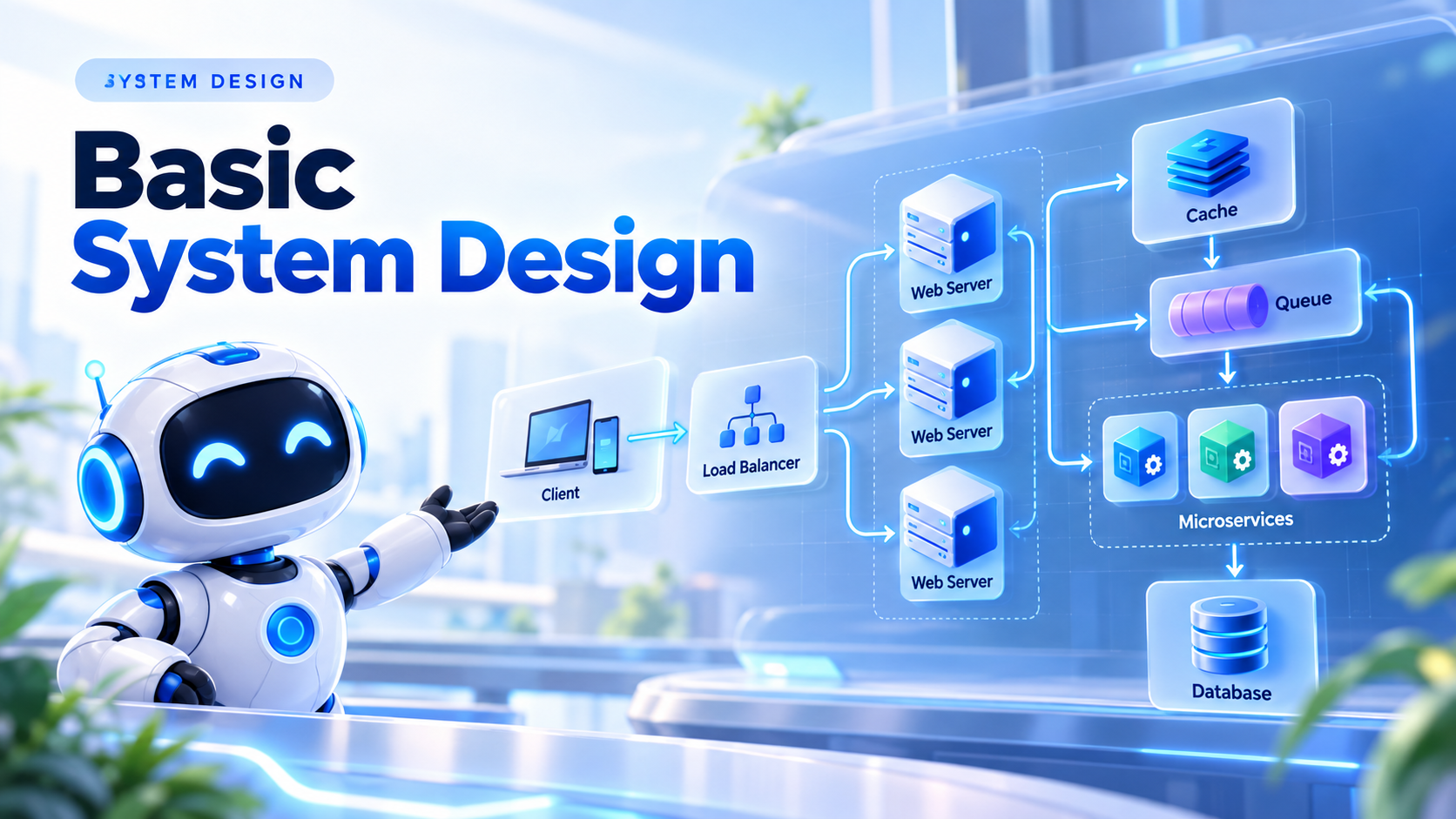
Ghép các mảnh trên lại, một web quy mô lớn thường trông như sau — theo dấu một request từ trình duyệt tới tận DB:
   Người dùng
       │
       ▼
   [ DNS ] ──▶ [ CDN ]  ◀── ảnh, JS, CSS, video (nội dung tĩnh)
       │
       ▼  (nội dung động)
   [ Load Balancer ]   health check · round-robin
       │
   ┌───┼───────────┐
   ▼   ▼           ▼
 [App1][App2] ... [AppN]   máy chủ STATELESS, scale ngang
   └───┬───────────┘
       │  đọc nóng          việc nặng, chạy nền
       ▼                    │
   [ Cache: Redis ]         ▼
       │              [ Message Queue ] ──▶ [ Workers ]
       ▼
   [ Database ]  Primary (ghi) + Replicas (đọc), đã sharding
Luồng: người dùng → DNS trỏ tới điểm gần nhất → nội dung tĩnh trả thẳng từ CDN; nội dung động qua load balancer tới một máy chủ stateless; máy chủ thử cache trước, miss thì đọc DB (replica cho đọc, primary cho ghi); việc nặng được đẩy vào hàng đợi cho worker xử lý nền.
Gần như mọi hệ thống web lớn đều là biến thể của sơ đồ này. Nắm sơ đồ này là bạn có "khung xương" để bắt đầu bất kỳ bài System Design nào, rồi tùy yêu cầu mà thêm/bớt từng khối.
Cạm bẫy
E — ☠️ Cạm bẫy thường gặp
Những lỗi khiến thiết kế đẹp trên giấy nhưng sập trong thực tế.
💀 Bẫy #1 — Tối ưu quá sớm / over-engineering. Chưa có người dùng đã bày microservices, Kafka, đa vùng. Bắt đầu đơn giản, mở rộng khi thật sự cần.
💀 Bẫy #2 — Điểm hỏng duy nhất (SPOF). Một load balancer, một DB, một cache — chết là sập cả hệ thống. Luôn có dự phòng cho thành phần trọng yếu.
💀 Bẫy #3 — Quên tầng dữ liệu. DB thường là nút thắt cổ chai đầu tiên. Web server thêm là xong, nhưng scale DB (replica, shard) mới là phần khó.
💀 Bẫy #4 — Máy chủ có trạng thái. Lưu session trên máy làm hỏng scale ngang (người dùng phải luôn về đúng máy cũ). Đẩy trạng thái ra ngoài (Redis/DB).
💀 Bẫy #5 — Không có chiến lược cache. Cache bừa dẫn tới dữ liệu cũ khó lường; hoặc cache stampede làm sập DB khi hết hạn đồng loạt.
💀 Bẫy #6 — Bỏ qua giám sát. Không log, không metric, không cảnh báo → không biết hệ thống đang khỏe hay ốm cho tới khi người dùng la làng.
💀 Bẫy #7 — Thiết kế cho sai quy mô. Không ước lượng con số nên hoặc phí tài nguyên, hoặc vỡ trận khi tải tăng. Luôn tính back-of-envelope trước.
Tra cứu
F — 📋 Bảng tra cứu thần tốc
Vấn đề → công cụ, và các con số nên thuộc.
| Vấn đề | Công cụ |
|---|---|
| Quá nhiều lưu lượng cho 1 máy | Scale ngang + load balancer |
| Đọc chậm / DB quá tải đọc | Cache + read replica |
| Người dùng ở xa, tải tĩnh chậm | CDN |
| Dữ liệu/ghi vượt một máy | Sharding |
| Việc nặng làm chậm request | Message queue + worker nền |
| Cần đúng tuyệt đối (tiền) | SQL + giao dịch ACID (nghiêng CP) |
Vài con số độ trễ nên thuộc (bậc độ lớn):
   Đọc RAM              ~100 nano-giây
   Đọc SSD (ngẫu nhiên) ~100 micro-giây   (chậm hơn RAM ~1.000 lần)
   Round-trip trong DC  ~0,5 mili-giây
   Đọc đĩa HDD          ~10 mili-giây     (chậm hơn RAM ~100.000 lần)
   Mạng xuyên lục địa   ~150 mili-giây
Bốn câu hỏi khi gặp bài System Design: (1) Quy mô bao nhiêu (người dùng, QPS, dung lượng)? (2) Đọc nhiều hay ghi nhiều? (3) Cần nhất quán mạnh hay chấp nhận cuối? (4) Đâu là nút thắt cổ chai và làm sao mở rộng nó?
Lời kết
🎓 Tâm pháp System Design
Năm câu gói trọn tư duy thiết kế hệ thống cơ bản.
- Bắt đầu từ yêu cầu & con số, không từ công nghệ. Ước lượng QPS/dung lượng trước khi vẽ hộp.
- Scale dọc tới khi hết, rồi scale ngang với load balancer + máy chủ stateless.
- Đọc nhiều hơn ghi → cache + read replica. Đây là đòn bẩy hiệu năng lớn nhất và rẻ nhất.
- Vượt một máy → sharding; cần bền → replication. Và nhớ CAP: khi phân vùng, chọn C hay A.
- Việc gì không cần đồng bộ → đẩy ra hàng đợi. Request nhanh, hệ thống chịu đỉnh tải mượt.
System design không phải phép màu — nó là vài viên gạch nền tảng ghép lại một cách có chủ đích, luôn kèm câu hỏi "đánh đổi cái gì". Nắm chắc bảy viên gạch trong bài, tự hỏi bốn câu định hình mỗi lần thiết kế, và bạn sẽ ráp được phần lớn hệ thống thực tế. 🏗️
Mọi kỹ thuật ở đây đều phục vụ một mục tiêu: loại bỏ nút thắt cổ chai và điểm hỏng duy nhất, trong ngân sách cho phép. Thiết kế tốt không phải cái phức tạp nhất, mà là cái đơn giản nhất vẫn đáp ứng được yêu cầu.
Bình luận 0
Chưa có bình luận nào. Hãy là người đầu tiên!